

To build an AI agent for production, scope the agent to one job with a measurable success metric and a measured baseline, and write a short spec that later becomes the eval rubric. Route each step to the cheapest model that passes its eval, and wrap the model in a harness of tools, context, permissions, guardrails and tracing. Put human approval on actions that move money, change personal data or cannot be undone. Release in stages, with every run traced and the cost per run known before launch. An agent released without an eval gate on outputs and trajectories drifts unnoticed once real traffic arrives.
An agent loop that plans, calls a tool, reads the result and acts again can be working by the end of the day. That first working loop is the easy part, and the small part of the job. The rest decides whether the project survives. Gartner predicted in June 2025 that over 40% of agentic AI projects will be canceled by the end of 2027, citing escalating costs, unclear business value and insufficient risk controls.
That remaining work is agentic engineering: building with agents inside human-defined constraints, tests, evals and feedback loops. For teams building AI agents, how to build an AI agent for production comes down to a 7-step path. Around it sit the architecture, the framework choice, the cost per run and the failure modes to design out.
What Is an AI Agent, and When Should You Not Build One?
An AI agent is software that uses an LLM to pursue a goal in a loop until a stop condition is met. In each pass, it plans, calls a tool, observes the result and decides the next step. As a formula, agent = model + harness: the model supplies the reasoning, and everything wrapped around it decides whether that reasoning turns into dependable work.
Unlike earlier rule-based or reinforcement-learning agents, LLM agents start from a pretrained model with broad language understanding, so most of the work is connecting it to your own data and systems.
Anthropic’s guidance on building effective agents separates two designs. A workflow runs LLM steps on a predefined code path, while an agent chooses its steps and tools at run time. OpenAI’s practical guide reserves agents for decisions that need nuanced judgment, rule sets too brittle to maintain, or processes that rely heavily on unstructured data. Where none of these applies, a deterministic solution is cheaper and more reliable.
Scripted automation handles predictable tasks well, while a goal-driven loop earns its place in complex workflows where the next step is unknown. That split sits at the heart of AI automation vs AI agents. The table below maps common problem shapes to the simplest system that handles them, and each row down adds capability along with failure surface.
Do you need an AI agent?
Your problem looks like… | Build this | Why |
|---|---|---|
Fixed rules, structured data, stable process | Rule-based automation or RPA | Deterministic, cheapest, easiest to audit |
Answer questions from your documents | RAG assistant | Retrieval plus generation; no actions needed |
Known sequence of steps, some need judgment | LLM workflow (prompt chain, router) | Predictable path, AI only where needed |
Open-ended goal, steps unknown in advance, actions in several systems | AI agent | Needs run-time decisions and tool use |
Several distinct specialties, each with its own tools | Multi-agent system (only after a single agent proves out) | Specialization, at the price of more failure surface |
Your problem looks like…
Fixed rules, structured data, stable process
Answer questions from your documents
Known sequence of steps, some need judgment
Open-ended goal, steps unknown in advance, actions in several systems
Several distinct specialties, each with its own tools
Build this
Rule-based automation or RPA
RAG assistant
LLM workflow (prompt chain, router)
AI agent
Multi-agent system (only after a single agent proves out)
Why
Deterministic, cheapest, easiest to audit
Retrieval plus generation; no actions needed
Predictable path, AI only where needed
Needs run-time decisions and tool use
Specialization, at the price of more failure surface
A process in the first row, such as repetitive tasks on structured data, usually reaches value faster through RPA development. A need in the RAG row, such as answering questions from internal documents, belongs to generative AI development. Where the task is pattern recognition over large datasets, a classic machine learning model often fits better than an agent.
Before deciding how to create an AI agent, define its role and name the owner, the task, the success metric and the cost of a wrong action. If any of these is missing, it is too early to build.
How Do You Build an AI Agent? The 7-Step Production Path
How to build an AI agent for production comes down to seven steps: scope one job, choose and route models, design tools and context, build the harness, set guardrails and approval points, evaluate before production, then deploy and observe.
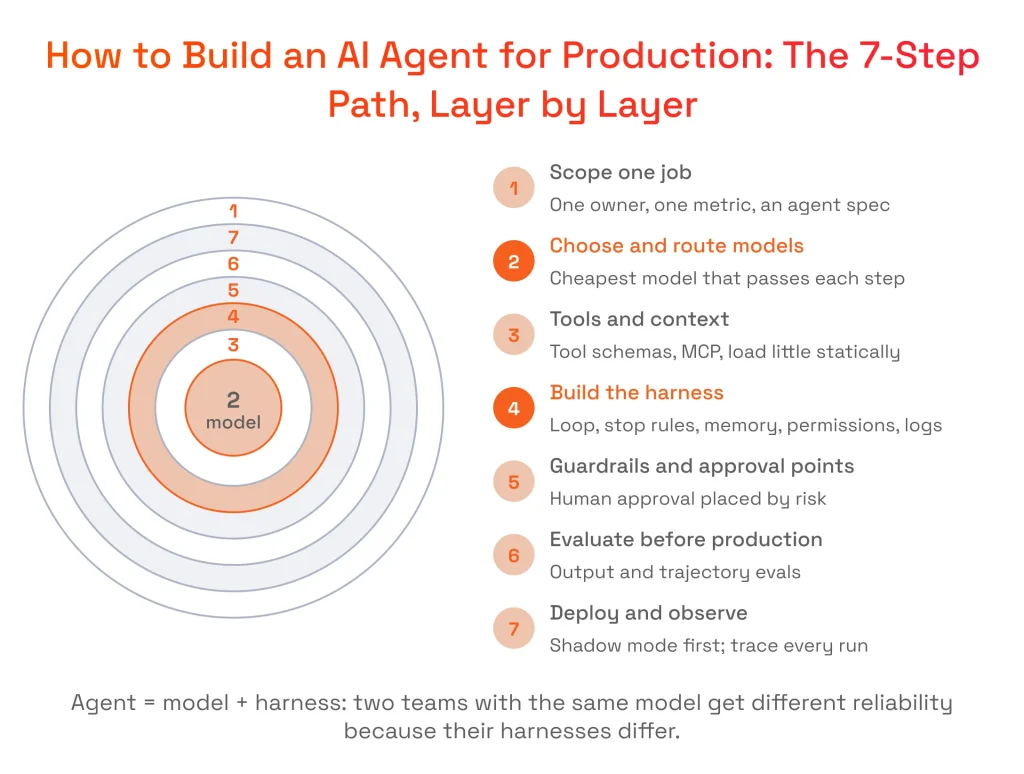
Each step produces something the next one depends on, so the sequence works for a first AI agent and for every one after it.
- Scope one job and define success
- Choose the model and route by task
- Design the agent’s tools and context
- Build the agent harness around the model
- Set guardrails and human-in-the-loop approval points
- Evaluate the agent before production
- Deploy, observe and improve the agent
Step 1. Scope One Job and Define Success
An agent is ready to build once it has one narrow job, one owner and one measurable outcome with a known baseline. Pick a metric the business already tracks, such as resolution rate on support tickets, handling time or error rate, and measure it before the build starts so later results have something to beat.
Then write a short agent spec covering the goal, inputs, allowed actions, forbidden actions, escalation rule and definition of done. That spec later becomes the eval rubric, which is the working principle of spec-first development.
Broad scope produces the Swiss Army agent, asked to handle billing, onboarding and support at once. Each extra job multiplies tools, context and failure modes, so an agent focused on specific tasks is far easier to test.
Step 2. Choose the Model and Route by Task
Choose a model for each step on accuracy, latency and cost, then send each step to the cheapest model that holds the accuracy bar. OpenAI’s guide recommends setting a baseline with the most capable model first and then testing smaller models against it. The outcome is model routing: classification and extraction go to a small model, and planning and judgment go to a stronger one.
Routing decisions need repeated testing, because the same input can produce different outputs, one of the three properties of LLMs. Hosting adds another constraint. API access and private deployment carry different data-residency obligations, so settle early where the model runs. For self-hosted setups, the trade-offs of choosing an open-weight model also shape the rest of the stack. Fine-tune only when prompting and retrieval miss the accuracy bar, and only with high-quality training data. The cost section shows what routing saves.
Step 3. Design the Agent’s Tools and Context (Context Engineering)
An agent picks the right tools when every tool has a name, a clear description, an input schema and stated limits. In tool calling, the model returns a structured request, and the runtime executes the tool and returns the result, which is why permissions belong in the harness around the model.
Typical agent tools include web search, database queries, ticketing APIs and connectors to external data sources. Anthropic advises writing tool descriptions as you would for a new team member and making wrong usage hard; its example is requiring absolute file paths, which removes a whole class of relative-path mistakes. At the integration level, the Model Context Protocol (MCP) standardizes how agents connect to tools and data sources, so each integration is built once and reused.
Context engineering is deciding what the model sees at each step: instructions, knowledge, memory, examples, tool definitions and guardrails. Prompt tweaking fixes one answer, while context engineering shapes the system that produces every answer.
- Static context is always loaded and holds system instructions and rules.
- Dynamic context is retrieved when the step needs it, such as RAG results, tool output, session history and task-specific skills.
Load little statically and retrieve the rest on demand. Everything loaded up front is paid for on every call and competes for the model’s attention, so it raises cost and lowers accuracy at once.
Step 4. Build the Agent Harness Around the Model
The harness is everything around the model that makes it work, and agent harness engineering is the discipline of building it deliberately. Its core is a run loop with stop conditions such as maximum steps and maximum spend. Around that loop sit memory, permissions and scoped credentials, retries and timeouts, error handling, sandboxed actions and logging hooks.
Scoped credentials limit what a manipulated prompt can reach, a concern shared with the security risks in AI-generated code. Memory needs the same care: it splits into short-term session state and long-term stored facts, each with its own retention and privacy rules.
This is where agent = model + harness shows up in practice. Two teams running the same model on the same task get different reliability because their harnesses differ.

Serhii Leleko
AI & ML Engineer at SPD Technology
“The model is the component a team will swap most often, so we treat it as replaceable and put the engineering effort into what stays: tool descriptions, loop limits, scoped credentials and the eval suite. When a model update lands, the harness is what lets us answer quickly whether the agent still behaves, because the same evals that approved the last release run against the new model before anything reaches users.”
Version the harness like code, with instructions, tool definitions and model IDs in the repository, so every change can be evaluated and rolled back. That habit is agentic engineering at the level of a single commit.
Step 5. Set Guardrails and Human-in-the-Loop Approval Points
Guardrails work as layers at the input, at each tool and at the output. OpenAI’s guide describes input checks for relevance, jailbreak attempts and PII, tool safeguards that give each tool a risk rating, output validation, and rules-based limits such as blocklists and spend caps.
The market term for placing people in this flow is human-in-the-loop. Oversight works best when autonomy is set per action by risk, a principle we call calibrated autonomy, which sits behind guardrails that do not slow delivery.
- Always human-led covers money movement, personal data changes and irreversible or architectural actions.
- AI-assisted, human-verified means the agent drafts or proposes and a person approves.
- Automated, machine-verified applies to low-risk, reversible actions that tests and evals check.
OpenAI’s guide also recommends handing control to a person once an agent exceeds a failure threshold, such as repeated failed attempts, so decisions stay with people when the agent is stuck.
Step 6. Evaluate the Agent Before Production (Evals)
The dependable way to evaluate AI agents before production is a repeatable suite with its release bar written down in advance. Tests check deterministic code, where the same input always gives the same output. Evals score non-deterministic behavior against a dataset and a rubric, often with LLM-as-judge grading plus human spot checks.
Turning a model into a reliable grader is the core of eval engineering. Build the dataset from real cases, edge cases and known failures, and fix the release bar before anyone sees results or the demo. Then re-run the full suite on every change to instructions, tools or model version.
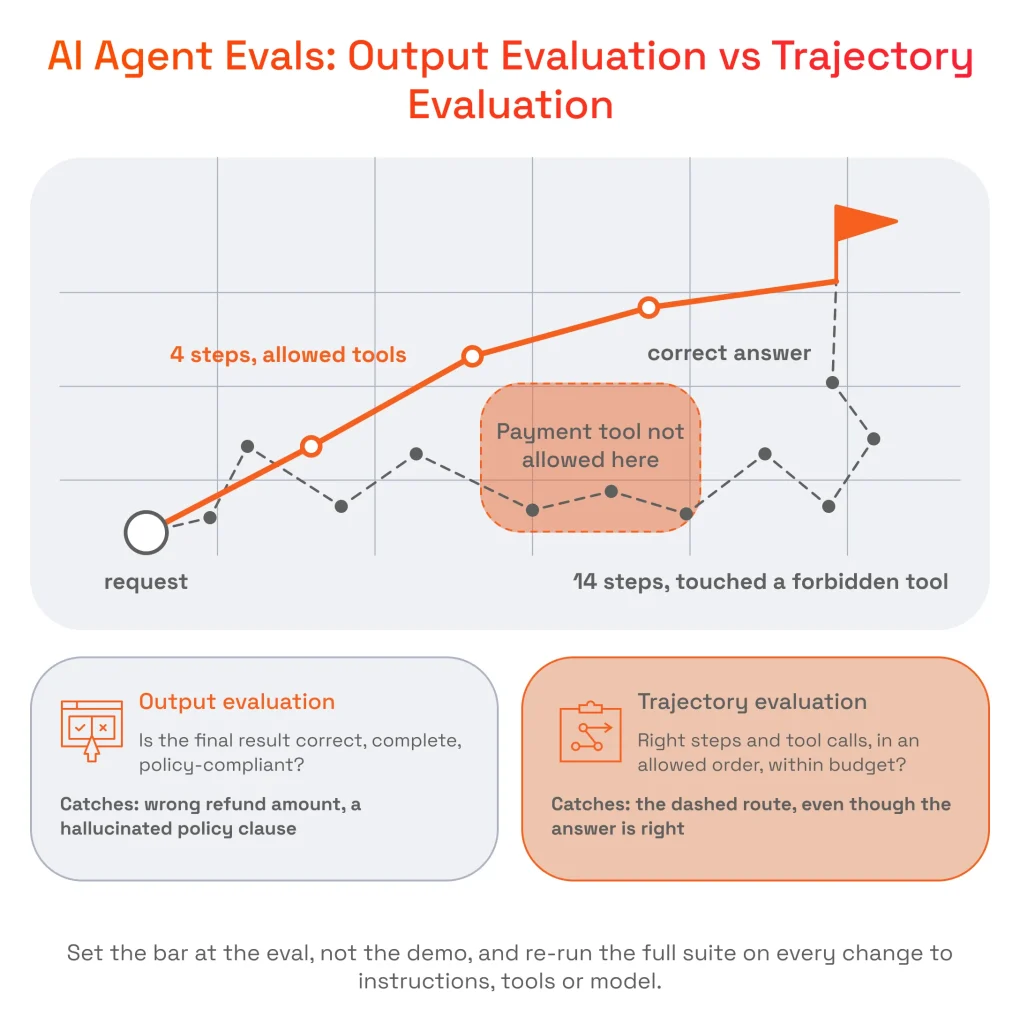
An agent can be judged on where it ended up and on how it got there. Each check catches failures the other misses, so a complete eval covers both.
Two things every agent eval must check
Eval type | What it checks | Example failure it catches |
|---|---|---|
Output evaluation | Is the final result correct, complete and policy-compliant? | Wrong refund amount; hallucinated policy clause |
Trajectory evaluation | Did the agent take the right steps and tool calls, in an allowed order, within budget? | Correct answer reached after calling a payment tool it should not touch, or after 14 steps instead of 4 |
Eval type
Output evaluation
Trajectory evaluation
What it checks
Is the final result correct, complete and policy-compliant?
Did the agent take the right steps and tool calls, in an allowed order, within budget?
Example failure it catches
Wrong refund amount; hallucinated policy clause
Correct answer reached after calling a payment tool it should not touch, or after 14 steps instead of 4
Step 7. Deploy, Observe and Improve the Agent
An agent reaches full traffic in stages, with a rollback path at each one. It starts in shadow mode, where the agent proposes and humans act, then moves to limited traffic and finally to all of it. Observability means tracing every run: inputs, steps, tool calls, tokens, latency, cost and outcome. Uptime monitoring confirms the agent is running, while traces show whether its answers and actions are correct.
Production failures feed back into the eval set as new cases. Before any model or prompt update ships, the team evaluates it, diagnoses what broke, fixes it, verifies the fix against the suite and resumes monitoring.
Taking an agent from a working prototype to a system under real traffic follows the predictable 90-day path from AI MVP to production system.
What Does an AI Agent Architecture Look Like? Single Agent vs Multi-Agent
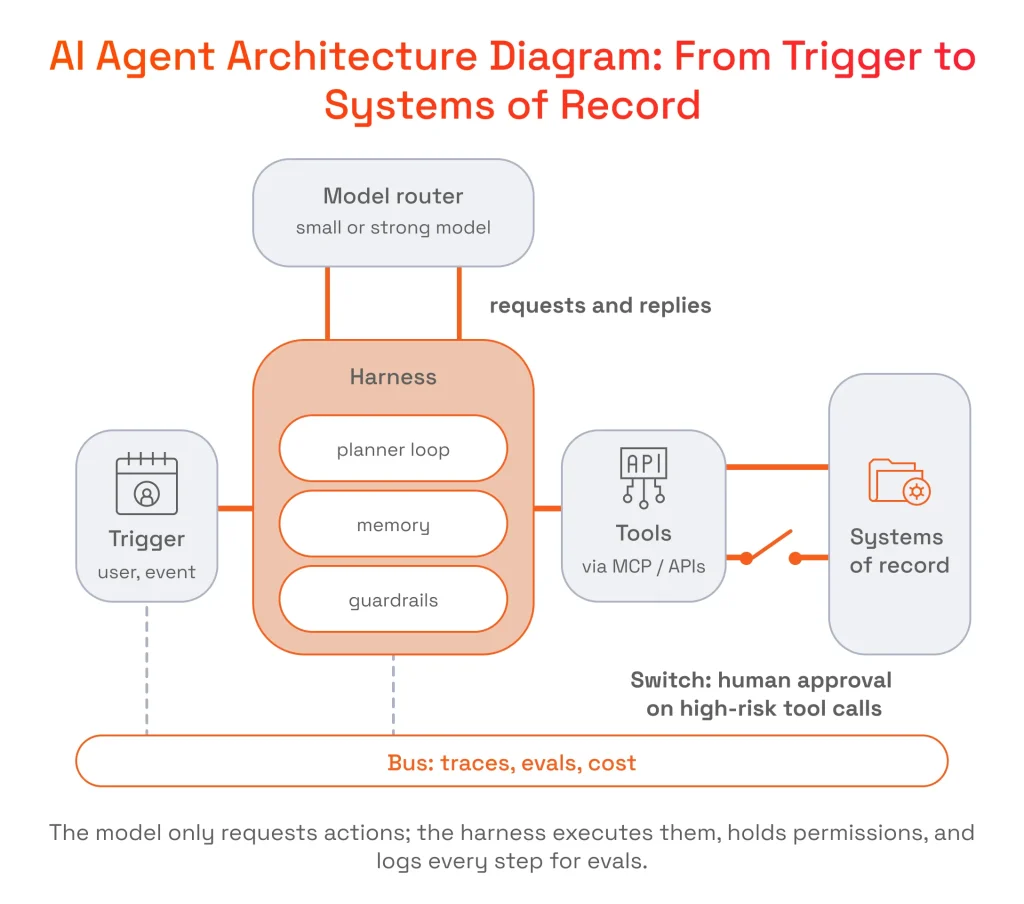
A production AI agent architecture has five layers: an interface or trigger; the model or routed models; the agent harness with its loop, memory, permissions and guardrails; the tools and data reached through APIs, databases and MCP servers; and an evaluation and observability layer that watches all of them. Most of the agent’s value sits in the systems of record it touches, which makes integrating AI with enterprise systems a design task in its own right.
When Is a Single Agent Enough?
Start with one agent that owns the whole job, since a single agent is easier to evaluate, trace and debug. OpenAI’s guide names two signals for splitting: instructions that start to contradict each other, and a toolset so large that the agent picks the wrong tool.
Which Multi-Agent Pattern Should You Use?
OpenAI’s guide describes two patterns. In the manager pattern, one orchestrator calls specialist agents as tools and keeps control, a shape Anthropic calls orchestrator-workers. In the handoff, or decentralized, pattern, agents pass control to each other.
Each added agent brings its own failure surface, token cost and eval set, so every split needs its own justification. Orchestration choices also shape oversight, which makes them part of production AI architecture and governance.
Agents and tools also need agreed ways to connect, and three standards cover what teams meet in practice.
Connection standards in an agent architecture
Standard | Problem it solves | When you need it |
|---|---|---|
Tool/function calling | Lets the model request an action with structured arguments | Always |
Model Context Protocol (MCP) | Standard way to expose tools and data sources to any agent | When the agent connects to several systems or tools are reused across agents |
Agent2Agent (A2A) | Lets one agent delegate a task to another agent, across vendors or teams | Only when independent agents must collaborate |
Standard
Tool/function calling
Model Context Protocol (MCP)
Agent2Agent (A2A)
Problem it solves
Lets the model request an action with structured arguments
Standard way to expose tools and data sources to any agent
Lets one agent delegate a task to another agent, across vendors or teams
When you need it
Always
When the agent connects to several systems or tools are reused across agents
Only when independent agents must collaborate
Should You Use an AI Agent Framework, a Platform or Build Custom?
Teams that build AI agents have three main options. A managed platform suits agents that live inside one vendor’s suite, where speed matters more than control. A code-first framework suits production agents that need custom tools, evals and deployment, while building directly on model APIs suits simple, high-stakes or highly specific agents.
Anthropic advises starting with LLM APIs directly and understanding what a framework does underneath before adopting one. Teams that build their own AI agent on model APIs get full control over the loop, and full responsibility for evals and tracing.
The tools named below are examples within each category, so compare them on the criteria your release process depends on.
Criterion | Managed / low-code platform (e.g., Copilot Studio, watsonx Orchestrate, Joule Studio) | Code-first framework (e.g., OpenAI Agents SDK, LangGraph, CrewAI, Microsoft Agent Framework) | Custom on model APIs |
|---|---|---|---|
Speed to first version | Fastest | Fast | Slower |
Control over loop, tools, memory | Limited to the platform | High | Full |
Eval and observability options | Platform-provided | Bring your own or framework add-ons | Bring your own |
Vendor lock-in | High | Medium (framework) | Low |
Data control and compliance fit | Depends on the platform’s hosting | You choose hosting | You choose hosting |
Best fit | Internal agents in one vendor’s ecosystem | Production agents with custom tools | Simple, high-stakes or highly specific agents |
Criterion
Speed to first version
Control over loop, tools, memory
Eval and observability options
Vendor lock-in
Data control and compliance fit
Best fit
Managed / low-code platform (e.g., Copilot Studio, watsonx Orchestrate, Joule Studio)
Fastest
Limited to the platform
Platform-provided
High
Depends on the platform’s hosting
Internal agents in one vendor’s ecosystem
Code-first framework (e.g., OpenAI Agents SDK, LangGraph, CrewAI, Microsoft Agent Framework)
Fast
High
Bring your own or framework add-ons
Medium (framework)
You choose hosting
Production agents with custom tools
Custom on model APIs
Slower
Full
Bring your own
Low
You choose hosting
Simple, high-stakes or highly specific agents
Should You Build an AI Agent In-House or With a Partner?
In-house works when the team has engineers who have shipped LLM features to production, an owner for evals and on-call, and time to build the harness. A partner fits when the timeline is short, the domain is regulated, or the team has yet to build an eval and observability stack. Whoever builds it, specs, evals and agent configuration should end up in your repository.
For teams implementing AI agents with outside engineers, agentic AI development services cover the build from spec to release. The wider market of AI agent development companies offers other options worth comparing on the same criteria.
If you are comparing vendors, use these evaluation criteria and questions for choosing an AI engineering partner.
How Much Does It Cost and How Long Does It Take to Build an AI Agent?
Building a production AI agent takes 6 to 10 weeks for one narrow workflow and 4 to 7 months for an advanced multi-tool system. Published 2026 build ranges run from about $15K for a proof of concept to $350K+ for regulated multi-agent systems. Running the agent adds operational costs for tokens, monitoring and review, and the per-run figure depends on steps, context size and routing.
Build cost is paid once and run cost scales with volume, so budget them separately. The ranges below are market figures from Master of Code Global’s November 2026 cost breakdown.
Agent scope | Typical build cost (market) | Typical timeline |
|---|---|---|
Proof of concept (1 use case, 0-1 integration) | $15K-$40K | 4-8 weeks |
Narrow production agent (1 workflow, 1-2 integrations) | $20K-$45K | 6-10 weeks |
Agent with RAG (2-4 integrations) | $45K-$100K | 10-16 weeks |
Advanced agentic system (multi-step tools, 5+ integrations) | $100K-$200K | 4-7 months |
Regulated or enterprise multi-agent | $180K-$350K+ | 6-12+ months |
Agent scope
Proof of concept (1 use case, 0-1 integration)
Narrow production agent (1 workflow, 1-2 integrations)
Agent with RAG (2-4 integrations)
Advanced agentic system (multi-step tools, 5+ integrations)
Regulated or enterprise multi-agent
Typical build cost (market)
$15K-$40K
$20K-$45K
$45K-$100K
$100K-$200K
$180K-$350K+
Typical timeline
4-8 weeks
6-10 weeks
10-16 weeks
4-7 months
6-12+ months
Run cost is where budgets slip unseen. KPMG’s Q2 2026 AI Quarterly Pulse found that only 26% of US organizations with $1B+ revenue had full, real-time visibility into what their AI systems cost to operate, and just 36% had direct token or usage controls. A per-run cost model closes that gap and anchors the wider picture of what AI development really costs.
The example below assumes 20,000 runs a month, 6 model calls per run, about 8,000 input and 500 output tokens per call, and Claude API list prices as of November 2026.
Worked example: run cost per month for one operations agent
Configuration | Cost per run | Cost per month |
|---|---|---|
All calls on Claude Opus 5.5 ($4 in / $20 out per 1M tokens) | ~$0.25 | ~$5,040 |
All calls on Claude Sonnet 5.5 ($2 / $10) | ~$0.13 | ~$2,520 |
Routed: 4 calls on Claude Haiku 5.5 ($0.10 / $0.50), 2 calls on Sonnet 5.5 | ~$0.046 | ~$924 |
Routed + prompt caching (5,000 of 8,000 input tokens per call read from cache at $0.01 Haiku / $0.10 Sonnet per 1M; cache writes excluded) | ~$0.025 | ~$508 |
Configuration
All calls on Claude Opus 5.5 ($4 in / $20 out per 1M tokens)
All calls on Claude Sonnet 5.5 ($2 / $10)
Routed: 4 calls on Claude Haiku 5.5 ($0.10 / $0.50), 2 calls on Sonnet 5.5
Routed + prompt caching (5,000 of 8,000 input tokens per call read from cache at $0.01 Haiku / $0.10 Sonnet per 1M; cache writes excluded)
Cost per run
~$0.25
~$0.13
~$0.046
~$0.025
Cost per month
~$5,040
~$2,520
~$924
~$508
These estimates are illustrative, based on public list prices and stated assumptions at the time of writing, and do not constitute a public offer.
A 300-case eval suite on the routed configuration costs about $16 per full run, including LLM-as-judge grading: about $14 for 300 agent runs at $0.046 each, plus about $1.80 for 300 judge calls on Sonnet 5.5 at roughly 2,000 input and 200 output tokens each. That is cheap enough to run on every change.
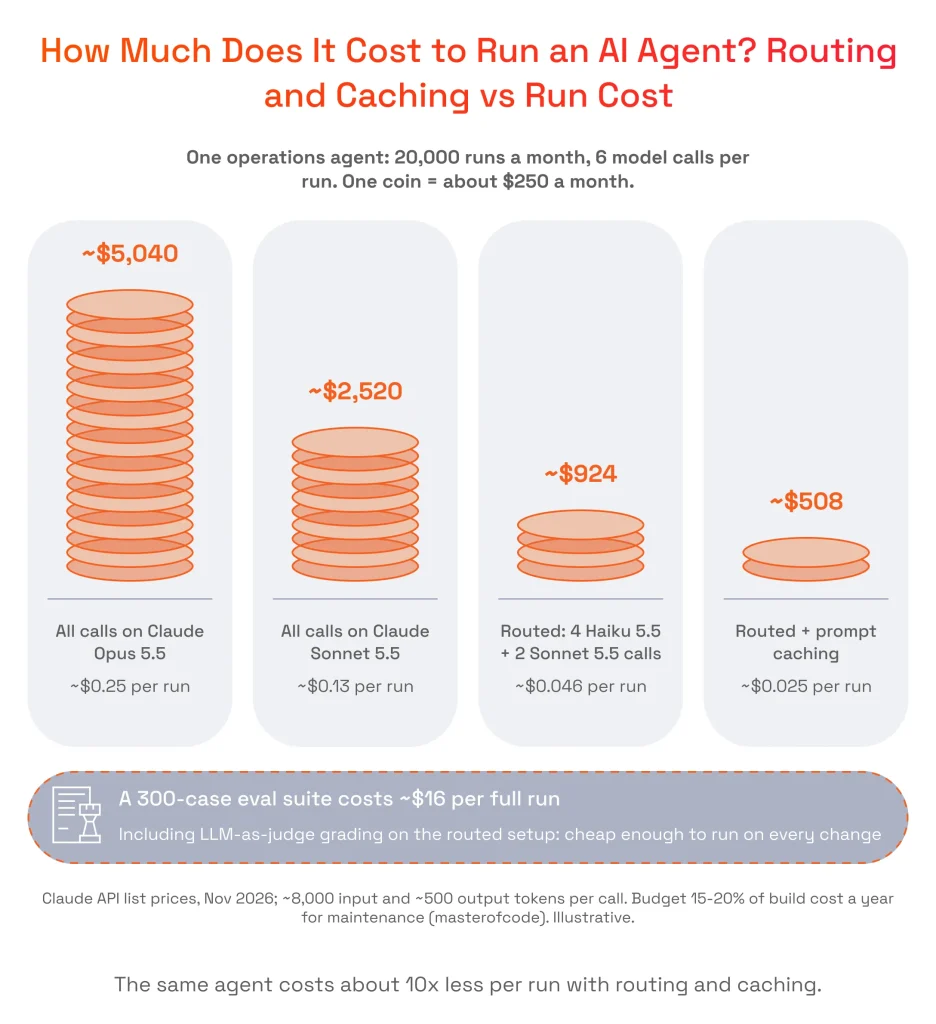
Routing and prompt caching cut the run cost of the same agent by roughly 10×. Master of Code Global puts maintenance at 15% to 20% of the build cost per year. Routing rules also need retuning as models change, which places them inside MLOps and model operations.
Sources: Anthropic Claude API pricing (rates as of November 2026; Haiku 5.5 rates apply to prompts up to 100K tokens); Master of Code Global, “How Much Does AI Agent Development Cost? A 2026 Breakdown,” November 2, 2026.
Why Do AI Agents Fail in Production?
Most production failures trace back to the harness: a missing eval gate, too much autonomy, overloaded context, no owner or no tracing. Each of these can be designed out before launch.
Many grow from the 80% problem, one of the scaling risks to expose early. The first version handles common cases fast, while edge cases, integrations, error handling and verification take most of the effort. Prototypes assembled quickly with AI coding tools carry the same gap into the agent’s codebase, which is why AI-generated code breaks in production.
Failure mode | What you see | Prevented by |
|---|---|---|
Demo shipped as product (vibe-coded prototype, no hardening) | Works on happy paths, breaks on edge cases | Steps 4 and 6 |
No eval gate | Quality drifts after a prompt or model update; nobody notices | Step 6 |
Over-autonomy | Agent takes a costly or irreversible action without approval | Step 5 |
Context overload | Rising cost, slower runs, wrong tool choices | Step 3 |
Swiss Army scope | Contradictory instructions, unclear success | Step 1 |
No observability | Cannot explain a bad outcome or a cost spike | Step 7 |
No owner | Nobody maintains evals, triages failures or approves releases | Step 1 |
Failure mode
Demo shipped as product (vibe-coded prototype, no hardening)
No eval gate
Over-autonomy
Context overload
Swiss Army scope
No observability
No owner
What you see
Works on happy paths, breaks on edge cases
Quality drifts after a prompt or model update; nobody notices
Agent takes a costly or irreversible action without approval
Rising cost, slower runs, wrong tool choices
Contradictory instructions, unclear success
Cannot explain a bad outcome or a cost spike
Nobody maintains evals, triages failures or approves releases
Prevented by
Steps 4 and 6
Step 6
Step 5
Step 3
Step 1
Step 7
Step 1
Before launch, run your agent through an AI production-ready checklist.
Why Partner with SPD Technology to Build an AI Agent?
SPD Technology builds AI agents that survive production by engineering the harness, evals, guardrails and observability around the model, and a named senior engineer is accountable for every release. That approach is agentic engineering applied to client delivery, and it defines our AI agent development practice.
We designed an AI incident agent for a US fintech and payments platform around one approval rule: the agent proposes a PR-ready fix in under 30 minutes, and an engineer approves every merge. Incident response there had taken 60+ minutes and depended on 24/7 on-call engineers. The AI Incident Pilot now acknowledges incidents in about 2 minutes, investigates them and resolves up to 70% of incidents autonomously.
For a US ticketing platform, SPD Technology embedded Claude Code in engineering operations: 47 custom skills, 6 subagents and 19 slash commands now live in the client’s own repository, with 92% autonomous-run success on automation pipelines. Incidents are investigated read-only while humans decide and act.
The same engineering holds under load in a support chatbot for a French fashion eCommerce retailer. Running on LangChain, a Mistral LLM and RAG on AWS, it answers 99% of queries in under 10 seconds and holds 100% uptime at peaks of 30 requests per second.
Gift shoppers at Blackhawk Network often describe what they want in vague or emotional terms. To suggest products from those descriptions, SPD Technology validated a working semantic-search prototype in 3 days for about $25 before the full build. The production AI gift assistant then lifted search-to-purchase conversion by 12.5% and items per order by 16%.
Every engagement rests on three commitments.
- The first is to verify before release, with an evidence package per release that covers the change, tests, security checks, sign-off and rollback.
- The second is to match autonomy to risk.
- The third is to hand over the delivery system, with specs, evals and agent configuration in the client’s repository.
SPD Technology is a Select-tier member of the Claude Partner Network (Services Track), with Claude-certified architects.
See how an engagement is scoped, what you receive and how success is measured when starting an AI engineering engagement.
Conclusion
Knowing how to build an AI agent comes down to one formula: the model makes the agent capable, and the harness makes it reliable enough to ship. The work runs in a fixed order, from scope to routing, context, harness, guardrails, evals and observability, and each step gives the next one something concrete to build on. An agent released after it passes its evals against a bar set in advance is the one that survives production.
Key Takeaways
- An AI agent is a model plus a harness, so two teams using the same model can get very different reliability; the harness of tools, context, guardrails, evals and tracing decides whether the agent reaches production.
- Scoping an agent to one job with a baseline metric turns “does it work?” into a measurable eval and a release decision.
- Routing each step to the cheapest model that passes its eval, plus prompt caching, cuts run cost roughly 10× for the same agent, because cost scales with steps and context size more than with the model name.
- Evaluating only the final output misses agents that reach the right answer by forbidden or wasteful paths; trajectory evaluation catches them before users do.
- Placing human approval by risk keeps money, personal data and irreversible actions under human control without slowing low-risk work.
- Without tracing every run, a quality drop or cost spike after a model update cannot be explained or rolled back, so observability belongs in the first release.
In short: an AI agent survives production when its harness, eval gate and approval points are in place before launch and its cost per run is known.
FAQ
How do you build an AI agent step by step?
Start by scoping one job with a success metric and a measured baseline. Then choose and route models per step, define tools and context, and build a harness with loop limits, memory, permissions and logging. Add guardrails and human approval for high-risk actions, and evaluate outputs and trajectories against a fixed test set. Release gradually with every run traced. Context engineering runs through all seven steps, because what the model sees at each point shapes accuracy, cost and tool choice.
What is the difference between an AI agent, a chatbot and workflow automation?
A chatbot answers questions, while an AI agent acts through tools to reach a goal and decides its next move based on what each tool returns. Workflow automation follows a predefined path, even if some steps use an LLM. Workflows are cheaper and more predictable because the whole path is known in advance. An agent’s higher cost and failure surface are justified only when the path cannot be known in advance, as in an investigation where each step depends on the last tool result.
How long does it take to build a production AI agent?
A narrow production agent takes 6 to 10 weeks to build. Master of Code Global’s November 2026 breakdown puts an agent with RAG and several integrations at 10 to 16 weeks, and advanced multi-tool agents at 4 to 7 months. Regulated or multi-agent builds take longer, because approvals, audit trails and security reviews apply at every stage. An early eval set shortens the timeline, since it gives a clear release bar from the first weeks.
How much does it cost to run an AI agent per month?
Run cost is tokens per call × calls per run × runs per month, plus monitoring and human review. In the worked example at November 2026 Claude list prices and 20,000 runs a month, the same agent costs about $5,000 a month on the largest model and about $500 with model routing and prompt caching. Steps and context size affect cost more than model choice, so cutting calls and static context usually gives the biggest return.
Which framework should you use to build an AI agent?
Choose by where the agent lives and how much control you need. A managed platform such as Copilot Studio suits agents inside one vendor’s suite. A code-first framework such as the OpenAI Agents SDK or LangGraph suits custom tools, evals and deployment, and building on model APIs directly gives full transparency. Whatever the choice, the team must be able to see every prompt and tool call, or debugging and evaluation become very hard.
How do you test and evaluate an AI agent before launch?
Combine tests for deterministic code with evals for agent behavior. Build a fixed dataset of real cases, edge cases and known failures. Score both the final output and the trajectory, meaning the steps and tool calls the agent made, using rubrics, LLM-as-judge scoring and human spot checks. Set the pass bar before any review, and re-run the full suite after every change to prompts, tools or model version so regressions are caught before users see them.
Do you need MCP to build an AI agent?
No, not at the start. A single agent with a few tools works with plain tool calling. MCP becomes useful when an agent connects to several systems or when tools are shared across agents, because it standardizes how tools and data sources are exposed and makes each integration reusable. Permissions stay in the harness: MCP standardizes the connection, while access control, credential scoping and approval rules remain with the team that runs the agent.