

AI automation uses AI models (large language models, machine learning and document AI) to automate the steps of a business process that need judgment on unstructured input, such as reading invoices, classifying requests or flagging anomalies, while rules and RPA handle the predictable steps. RPA follows fixed rules; AI agents choose their own steps; most AI automation sits between the two on a fixed path. To start, pick one high-volume process with a measured baseline, give each step the simplest mechanism that works, test AI accuracy on real samples before go-live, route exceptions to people and log every decision for audit. In finance operations, handling exceptions usually costs more than the AI model itself.
Your RPA estate already handles accounts payable, so adding an AI layer looks simple. Then a vendor changes its invoice format and the bot stops. The AI pilot that passed every demo sample has no accuracy figure finance or compliance will accept. Every document neither system can resolve goes back to an analyst, and that manual review queue is where the operating cost sits. This guide shows where AI for business automation makes sense, what it costs per transaction, and how to keep it auditable on any platform.
What Is AI Automation?
AI automation embeds machine learning and large language models in an operational workflow so software can do work that needs interpretation. It covers what a rigid script cannot: reading unstructured PDFs, routing service requests, classifying transactions, predicting risk and drafting responses. Enterprise teams also call it intelligent automation or cognitive automation. Getting it right takes disciplined AI development combined with deterministic software engineering. When a message arrives as free text, natural language processing first extracts the intent and key entities before business rules run.
The AI vs automation distinction comes down to predictability versus judgment. Traditional automation executes the same instructions every time on structured fields. AI interprets, classifies and predicts under uncertainty when input varies in format or phrasing. Combining AI and automation lets a business automate a process end to end even when every vendor sends documents in a different layout.
Because probabilistic models generate output from learned patterns, the same input can produce slightly different phrasing or confidence scores from run to run, one of the three properties of LLMs. In an AP workflow, deterministic rules route incoming mail, an extraction model reads line items from any vendor template and runs the three-way match against POs, and a specialist approves flagged discrepancies. That is still a fixed workflow your engineers designed, with AI working inside one step. Once the model decides which step comes next, you are in AI agent territory.
AI Automation vs RPA vs AI Agents: What Is the Difference?
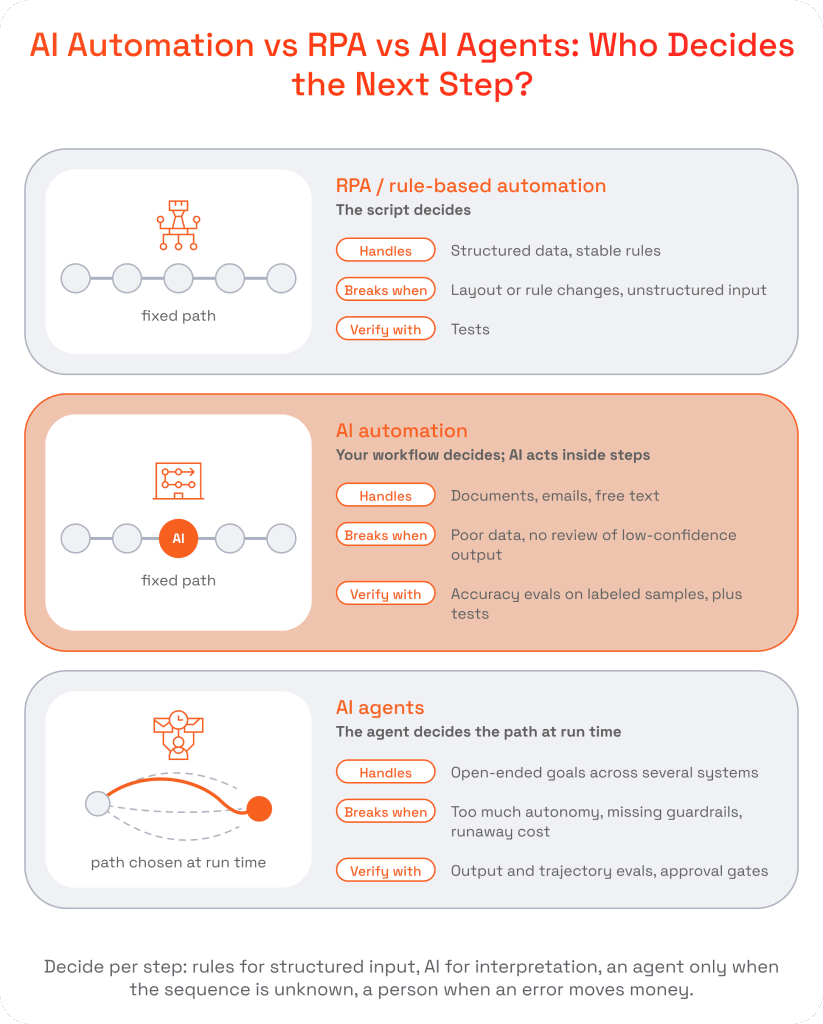
Robotic process automation runs fixed scripts on structured screens and fields. AI automation puts models into the steps that need interpretation along a fixed path. AI agents choose their own path and tools at run time. In a deterministic workflow, your engineers define the exact sequence and the AI executes inside it; in an agentic workflow, the model plans which tools to call, and in what order, until it reaches its goal.
Teams extending legacy scripts through RPA development hit a ceiling when document layouts change. Moving straight to agentic AI development introduces variable costs and harder verification. The table compares all three approaches.
Dimension | RPA / rule-based automation | AI automation | AI agents (agentic automation) |
|---|---|---|---|
What it handles | Structured data, stable screens and rules | Unstructured and variable input: documents, emails, free text, images | Open-ended goals across several systems |
Who decides the next step | The script | The workflow you designed; AI acts inside steps | The agent, at run time |
Typical tasks | Data entry, system-to-system transfers, scheduled reports | Invoice extraction, request classification, anomaly flagging, drafting replies | Investigating a reconciliation break, resolving a multi-system support case |
Where it breaks | Layout or rule changes, unstructured input | Low-quality data, unclear rules, no review of low-confidence outputs | Too much autonomy, unclear goals, missing guardrails, runaway cost |
How you verify it | Tests | Accuracy evals on labeled samples, plus tests | Output and trajectory evals, plus tests and approval gates |
Relative cost per transaction | Lowest | Low to moderate | Highest and most variable |
Dimension
What it handles
Who decides the next step
Typical tasks
Where it breaks
How you verify it
Relative cost per transaction
RPA / rule-based automation
Structured data, stable screens and rules
The script
Data entry, system-to-system transfers, scheduled reports
Layout or rule changes, unstructured input
Tests
Lowest
AI automation
Unstructured and variable input: documents, emails, free text, images
The workflow you designed; AI acts inside steps
Invoice extraction, request classification, anomaly flagging, drafting replies
Low-quality data, unclear rules, no review of low-confidence outputs
Accuracy evals on labeled samples, plus tests
Low to moderate
AI agents (agentic automation)
Open-ended goals across several systems
The agent, at run time
Investigating a reconciliation break, resolving a multi-system support case
Too much autonomy, unclear goals, missing guardrails, runaway cost
Output and trajectory evals, plus tests and approval gates
Highest and most variable
How Do You Choose Between RPA, AI and an AI Agent for Each Step?
Assign each step the cheapest mechanism that does it reliably. If inputs are structured and the logic is fixed, use deterministic rules or RPA. If the step interprets unstructured text or images and the next step is fixed, use AI task automation. Use an AI agent only where the sequence of tool calls depends on what is discovered along the way. Keep a person in control wherever funds move, personal records change or an action cannot be undone.
Running autonomous loops on predictable workflows raises token spend and multiplies failure modes. That is one reason Gartner expects over 40% of agentic AI projects to be canceled by the end of 2027 due to rising costs, unclear business value or insufficient risk controls. Where an agent is required, verification needs trajectory evaluation, which checks every tool call and reasoning step as well as the final answer. Teams that need dynamic tool use can follow the architecture patterns in how to build an AI agent.
How Does AI Automation Work?
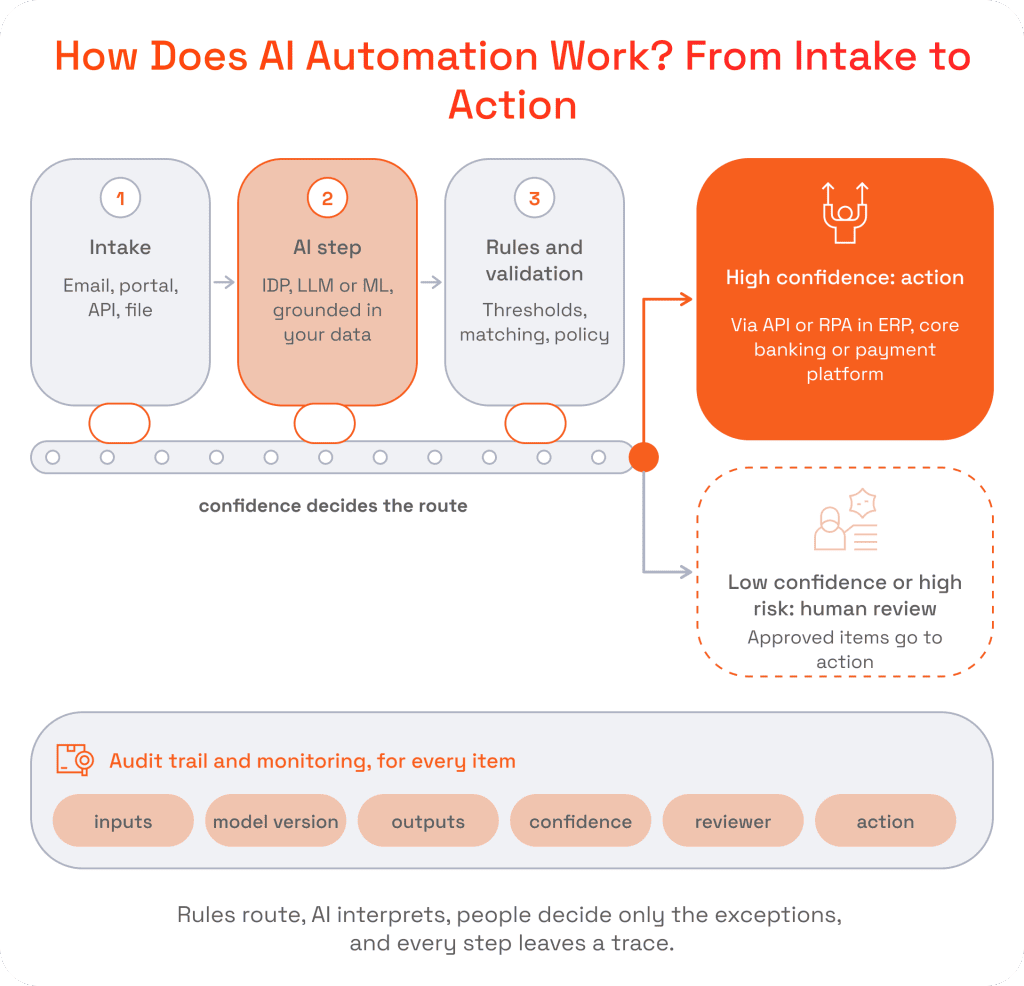
An AI process automation pipeline spans six layers: intake and trigger, AI processing, business rules and validation, human review for exceptions, actions in core systems, and a cross-cutting audit and monitoring layer. System health depends on how cleanly state and validation signals pass between layers, and the foundation model is the one component you can swap.
At intake and processing, intelligent document processing combines OCR and computer vision with ML or LLM extraction to pick up fields regardless of layout. The model is grounded with reference records where it needs them, such as the vendor master file, chart of accounts or underwriting policies. Orchestration sequences the steps, retries when an external service times out, keeps transaction state from start to finish, and handles conditional logic and data transformation between systems.
Validation rules then check extracted figures against arithmetic totals and policy limits before sending low-confidence or high-value items to human-in-the-loop review. Approved items move to the actions layer, where enterprise automation writes entries into the ERP, core banking or payment systems through API or UI bot connections. Where the workflow has agentic nodes, the Model Context Protocol (MCP) gives a standard interface to internal tools. An audit layer logs inputs, model versions and approvals at every stage.
What Are the Best AI Automation Use Cases in Finance and Operations?
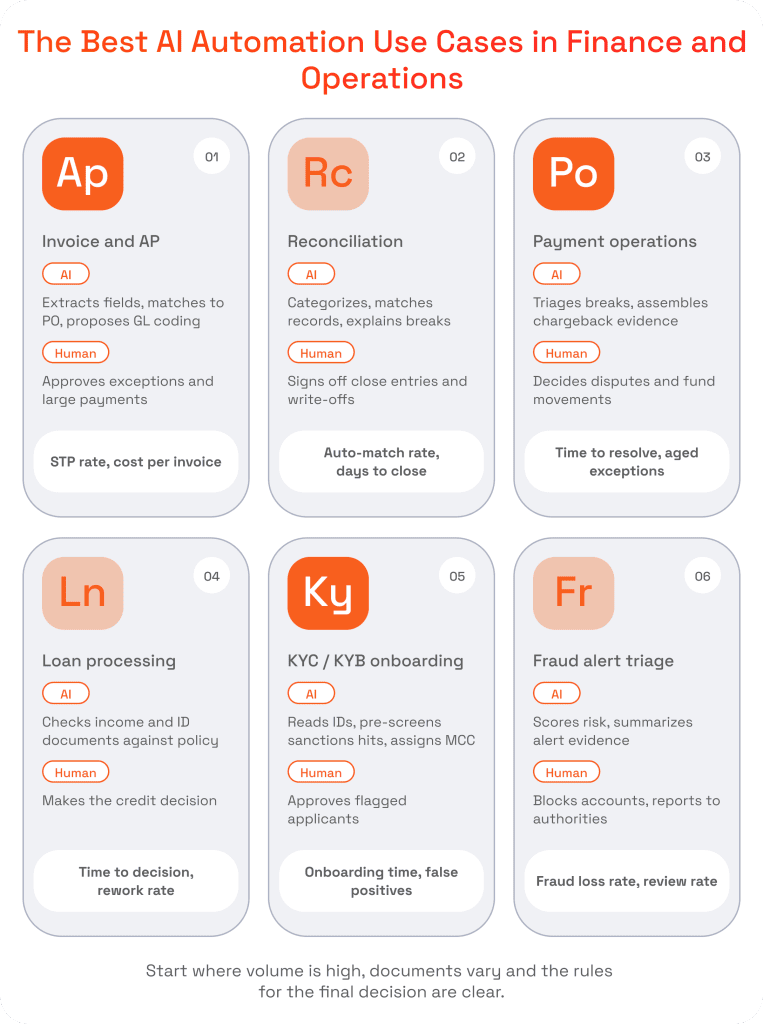
The strongest first candidates for AI business process automation are high-volume workflows with variable incoming documents and clear rules for the final decision. Finance and risk teams usually start with invoice and accounts payable processing, account reconciliation, payment operations exceptions, loan document verification, KYC/KYB onboarding and fraud alert triage. AI in AP automation for vendor invoices shows the fit well: invoice layouts vary widely, while three-way match tolerances and approval thresholds stay deterministic.
Use case | What AI does | What stays human | Metric to track |
|---|---|---|---|
Extracts fields from any layout, matches to PO and receipt, proposes GL coding | Approving exceptions and payments above a threshold | Straight-through processing rate, cost per invoice, exception rate | |
AI accounting automation and reconciliation | Categorizes transactions, matches records across systems, explains breaks | Signing off close entries and write-offs | Auto-match rate, days to close |
Triages reconciliation breaks, assembles chargeback evidence, routes payout exceptions | Dispute decisions and fund movements | Time to resolve, aged exceptions | |
Extracts and checks income and identity documents against policy before underwriting | The credit decision | Time to decision, rework rate | |
KYC/KYB and merchant onboarding | Reads IDs and company documents, pre-screens sanctions hits, assigns merchant category codes | Approving flagged applicants | Onboarding time, false-positive rate |
ML risk scoring, summarizes alert evidence for analysts | Blocking accounts, reporting to authorities | Fraud loss rate, review rate per 1,000 transactions |
Use case
AI accounting automation and reconciliation
KYC/KYB and merchant onboarding
What AI does
Extracts fields from any layout, matches to PO and receipt, proposes GL coding
Categorizes transactions, matches records across systems, explains breaks
Triages reconciliation breaks, assembles chargeback evidence, routes payout exceptions
Extracts and checks income and identity documents against policy before underwriting
Reads IDs and company documents, pre-screens sanctions hits, assigns merchant category codes
ML risk scoring, summarizes alert evidence for analysts
What stays human
Approving exceptions and payments above a threshold
Signing off close entries and write-offs
Dispute decisions and fund movements
The credit decision
Approving flagged applicants
Blocking accounts, reporting to authorities
Metric to track
Straight-through processing rate, cost per invoice, exception rate
Auto-match rate, days to close
Time to resolve, aged exceptions
Time to decision, rework rate
Onboarding time, false-positive rate
Fraud loss rate, review rate per 1,000 transactions
AI Automation Examples Beyond Finance
Support teams use conversational AI to classify requests, pull account history and draft replies that agents approve before sending, and to escalate urgent or complex tickets to a person. In engineering operations, a US fintech and SaaS platform needed 60+ minutes to reach a fix after an incident. SPD Technology built Incident Pilot, an AI incident management system that cut that to under 30 minutes to a PR-ready fix, reached up to a 70% successful autonomous resolution rate and removed the need for 24/7 on-call engineering.
What Results Can You Measure, and What Does AI Automation Cost?
The impact of AI for business automation shows up in five metrics measured against a pre-automation baseline: straight-through processing rate, field or classification accuracy, exception rate, cycle time and cost per transaction. In production, human exception handling is by far the largest operating cost, and foundation model API fees are a small share of the total.
An accurate baseline comes from process mining and data analytics that capture real manual handling minutes and rework frequency before any code is written.
KPI | What it tells you | Measure against |
|---|---|---|
Straight-through processing (STP) rate | Share of items completed with no human touch | Baseline manual volume |
Field / classification accuracy | Whether AI outputs are correct, per field or label | Labeled sample set (the eval set) |
Exception rate | Share of items routed to review | Target set before go-live |
Cycle time | Time from intake to completed action | Baseline process |
Cost per transaction (AI cost model) | Model + platform + review cost per item | Baseline fully loaded manual cost |
Post-go-live error rate | Errors found downstream (rework, reversals) | Pre-automation error rate |
KPI
Straight-through processing (STP) rate
Field / classification accuracy
Exception rate
Cycle time
Cost per transaction (AI cost model)
Post-go-live error rate
What it tells you
Share of items completed with no human touch
Whether AI outputs are correct, per field or label
Share of items routed to review
Time from intake to completed action
Model + platform + review cost per item
Errors found downstream (rework, reversals)
Measure against
Baseline manual volume
Labeled sample set (the eval set)
Target set before go-live
Baseline process
Baseline fully loaded manual cost
Pre-automation error rate
Track post-go-live error rates alongside automation volume. A rising straight-through processing rate paired with rising downstream reversals is a clear sign that confidence thresholds are set too low.
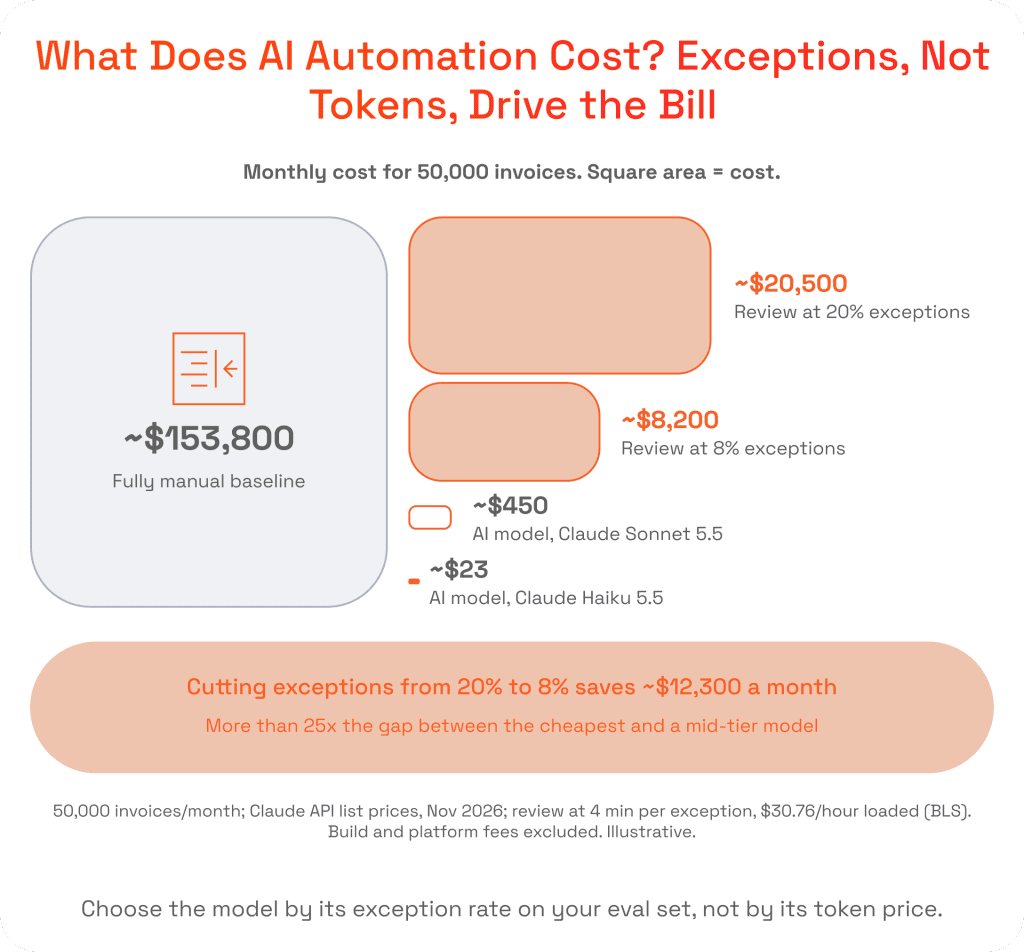
To see how model fees compare with manual review labor, take an AP team processing 50,000 invoices a month at about 3,000 input and 300 output tokens per invoice, at Claude API list prices as of November 2026 for prompts under 100K tokens. Assume 4 minutes of specialist review per exception, 6 minutes per invoice in the fully manual baseline, and a loaded rate of $31.67 an hour (the 2025 US BLS median of $24.36 for bookkeeping, accounting and auditing clerks × 1.3 for benefits and overhead). The example excludes build, integration and platform licensing.
Cost line | Monthly cost |
|---|---|
AI model on Claude Haiku 5.5 ($0.10 in / $0.50 out per 1M tokens) | ~$23 |
AI model on Claude Sonnet 5.5 ($2 / $10) | ~$450 |
Human review at 8% exception rate (4,000 invoices) | ~$8,400 |
Human review at 20% exception rate (10,000 invoices) | ~$21,100 |
Fully manual baseline (50,000 invoices) | ~$158,300 |
Cost line
AI model on Claude Haiku 5.5 ($0.10 in / $0.50 out per 1M tokens)
AI model on Claude Sonnet 5.5 ($2 / $10)
Human review at 8% exception rate (4,000 invoices)
Human review at 20% exception rate (10,000 invoices)
Fully manual baseline (50,000 invoices)
Monthly cost
~$23
~$450
~$8,400
~$21,100
~$158,300
These estimates are illustrative, based on public list prices, public wage data and stated assumptions at the time of writing, and do not constitute a public offer.
Cutting the exception rate from 20% to 8% saves about $12,700 a month, nearly 30 times the cost gap between the smallest and mid-tier models. That ratio is why choosing a model for an enterprise product depends on how few items fall below your confidence threshold on the eval set, not on raw token price.

Serhii Leleko
AI & ML Engineer at SPD Technology
“The first figure we ask an operations team for is how many invoices their people already rework by hand, because that queue is where an AI step will send its uncertain cases. We fix the confidence threshold on the eval set before any model comparison, then count how many items each candidate model pushes below it. A model that is cheaper per token can still cost more per month once its extra low-confidence items reach the review queue.”
How Do You Implement AI Automation Step by Step?
Implementing AI workflow automation takes seven steps: pick one process and set a baseline, map the steps and assign each a mechanism, check data and system access, decide whether to build or buy, build an evaluation set and set accuracy thresholds, pilot in shadow mode, then go live with a review queue and monitoring. Checking data readiness early keeps the project from stalling mid-way. Gartner predicts that through 2026, organizations will abandon 60% of AI projects unsupported by AI-ready data.
- Select one high-volume, rule-bounded workflow with an accountable business owner who can also manage change across the team, and record current processing cost, cycle time and error rates.
- Map every task in the workflow and assign deterministic rules, AI, an agent or a human specialist using the criteria above.
- Audit historical document quality, labeling availability and API access to core systems through targeted data engineering. In parallel, confirm regulatory and security boundaries to decide where the model runs.
- Decide whether to buy an off-the-shelf tool, extend existing RPA scripts, or build custom components with an engineering partner.
- Assemble an evaluation dataset from real historical transactions, including skewed scans, multi-page appendices and rare edge cases, and lock pass thresholds per field before comparing models.
- Run the pipeline in shadow mode on live traffic, so models score items silently while specialists work as usual, and verify that accuracy holds against your thresholds.
- Launch with confidence-based routing into a specialist review queue, real-time telemetry, a tested rollback switch and training for the team that works the queue. AI workflow automation degrades silently when vendor formats shift or model versions change, so re-run evals after every prompt, rule or model change; MLOps pipelines automate these regression checks and watch live confidence distributions for drift.
Before go-live, run the process through our AI production-ready checklist.
How Do You Govern AI Automation in Regulated Environments?
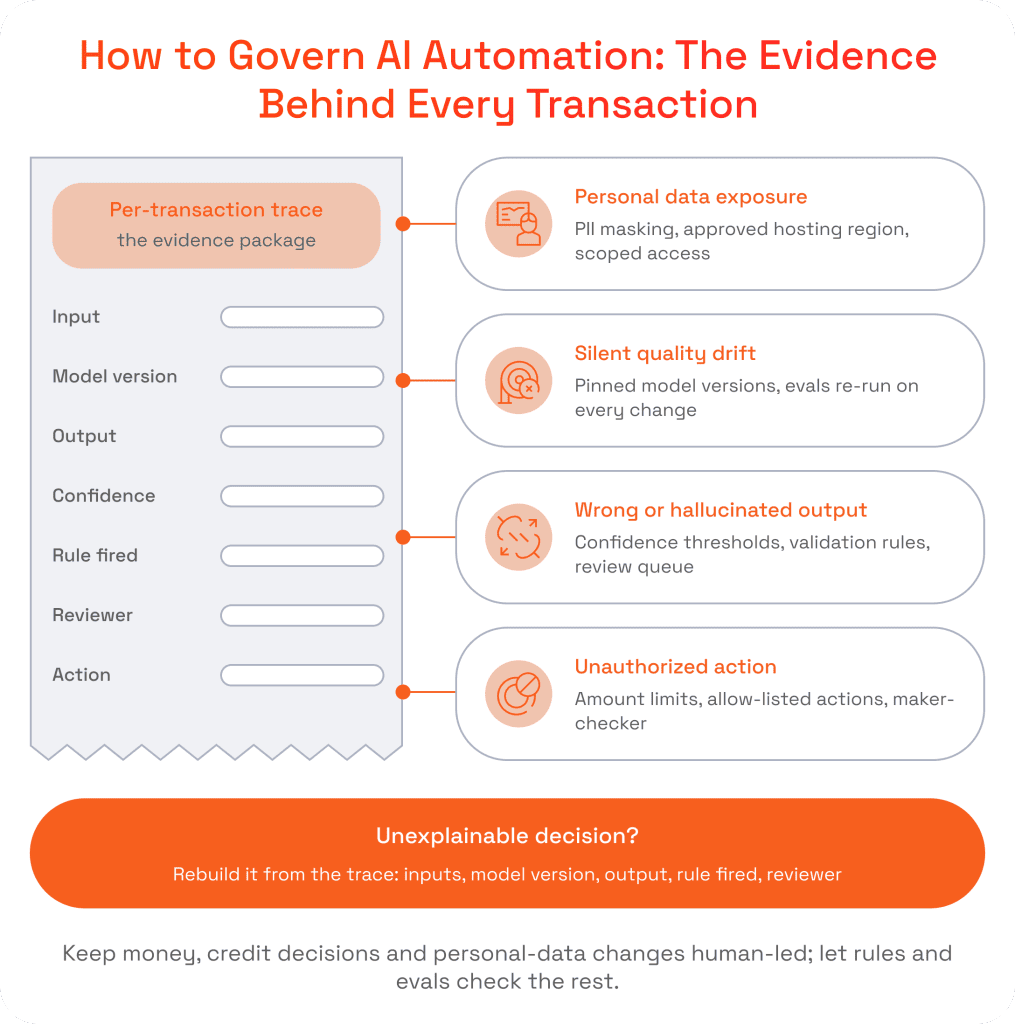
AI workflow automation governance rests on five controls: clear boundaries for where human decisions are required, human-in-the-loop review, validation of every model output against deterministic rules and confidence thresholds, a full audit trail, and restricted data access. Technical guardrails enforce these at run time through schema validation, PII masking, transaction amount caps and allow-listed API actions.
To turn human oversight into architecture, SPD Technology applies calibrated autonomy, which splits actions into three tiers:
- Always human-led: credit underwriting approvals, fund disbursements, account closures and changes to customer identity records stay manual across core banking and lending solutions.
- AI-assisted, human-verified: the model extracts fields, drafts summaries or flags anomalies, and a specialist confirms the output before execution.
- Automated, machine-verified: low-risk, reversible actions, such as tagging routine documents or routing standard tickets, run automatically once they pass deterministic validation rules and confidence thresholds.
In production, an AI eligibility classifier built for a US FSA/HSA payments company keeps over 200,000 healthcare products in sync at over 80% classification accuracy. The team also closed the platform’s HIPAA and SOC 2 gaps and moved releases to sub-day cycles on AWS ECS with Terraform and GitHub Actions.
Regulation reinforces these boundaries in financial services. GDPR Article 22 limits solely automated decisions with legal or similarly significant effects on individuals. Under the EU AI Act, systems that evaluate the creditworthiness of natural persons are high-risk under Annex III, and the AI Omnibus Regulation (EU) 2026/1744 set the application date for Annex III high-risk obligations to 2 December 2027. DORA requires financial entities to manage ICT third-party risk, which extends contractual and resilience oversight to external AI model providers.
Compliant processing records and regional hosting boundaries come from disciplined data governance across ingestion and inference pipelines. On top of access controls, SPD Technology keeps an evidence package for every transaction: the raw input, model version, output, confidence score, validation rules triggered, reviewer and final action, so compliance can reconstruct any decision. Sensitive customer and transaction data should reach only the systems and model steps that need it; in fraud monitoring, for example, a bank may combine transaction, payment and account-behavior data to spot anomalies, while higher-risk cases still go to review.
Risk | Control | Audit evidence |
|---|---|---|
Wrong or hallucinated output | Confidence thresholds, validation rules, review queue | Reviewer decisions per item |
Personal data exposure | PII masking, approved hosting region, scoped access | Access logs, data processing agreements |
Unauthorized action | Amount limits, allow-listed actions, maker-checker | Approval records |
Silent quality drift | Pinned model versions, evals re-run on every change, accuracy monitoring | Eval report per release |
Unexplainable decision | Log inputs, model version, output, rule fired, reviewer | Per-transaction trace (evidence package) |
Risk
Wrong or hallucinated output
Personal data exposure
Unauthorized action
Silent quality drift
Unexplainable decision
Control
Confidence thresholds, validation rules, review queue
PII masking, approved hosting region, scoped access
Amount limits, allow-listed actions, maker-checker
Pinned model versions, evals re-run on every change, accuracy monitoring
Log inputs, model version, output, rule fired, reviewer
Audit evidence
Reviewer decisions per item
Access logs, data processing agreements
Approval records
Eval report per release
Per-transaction trace (evidence package)
Should You Build, Buy or Partner for AI Automation?
Choose automation tools by process risk, scale, integrations and internal skills. For standard SaaS connectors and low-risk internal processes, use an off-the-shelf automation platform. Where legacy UI bots already do downstream entry, extend the RPA estate with document AI add-ons. Processes that touch regulated data, run at high volume or reach core financial systems through fintech software development need custom software, built in-house or with an engineering partner. Most mature AI automation programs combine two of these approaches, so the key decision is which architectural layers you own.
Option | Fits when | Watch out for |
|---|---|---|
Buy a no-code/low-code platform (e.g., Make, Zapier, Power Automate) | SaaS-to-SaaS workflows, low volume, non-regulated data; business users can build flows directly | Per-operation pricing at volume; IT still owns security, access and architectural standards |
Extend existing RPA with AI (e.g., UiPath or similar IDP add-ons) | Mature RPA estate, document-heavy steps | Brittle UI bots stay brittle; AI accuracy still needs evals |
Build custom in-house | Strong engineering and data team, core-system integration | Eval, monitoring and audit stack to build and staff |
Build with a partner, e.g. intelligent automation services | Regulated process, tight timeline, no in-house AI ops | Insist on ownership of code, eval sets and configuration |
Option
Buy a no-code/low-code platform (e.g., Make, Zapier, Power Automate)
Extend existing RPA with AI (e.g., UiPath or similar IDP add-ons)
Build custom in-house
Build with a partner, e.g. intelligent automation services
Fits when
SaaS-to-SaaS workflows, low volume, non-regulated data; business users can build flows directly
Mature RPA estate, document-heavy steps
Strong engineering and data team, core-system integration
Regulated process, tight timeline, no in-house AI ops
Watch out for
Per-operation pricing at volume; IT still owns security, access and architectural standards
Brittle UI bots stay brittle; AI accuracy still needs evals
Eval, monitoring and audit stack to build and staff
Insist on ownership of code, eval sets and configuration
Hybrids usually split along system boundaries: a low-code layer handles SaaS notifications, existing RPA bots post verified data into legacy ERP screens, and custom services do document extraction, confidence scoring and audit logging, which keeps the stack from fragmenting into data silos. When a partner builds the custom services, the contract should define IP ownership, evaluation criteria and the engineering handover from the start.
If you choose a partner, use these criteria and questions for selecting an AI engineering partner.
Where Should You Start With AI Automation? A 90-Day Plan
Start with one process that has high transaction volume, variable input formats, a measured baseline and a dedicated operational owner. High volume makes the labor savings compound, and discovery to production takes about 90 days. The five checks below show which workflow belongs at the top of your backlog.
- The process handles more than a few thousand items a month, so per-item labor savings add up to a clear financial return.
- Inputs vary in layout or phrasing, the condition where machine learning and LLMs outperform rigid scripts.
- Deterministic business rules already govern the final decision, so AI prepares structured data while rules or specialists approve the outcome.
- Model errors stay reversible or reviewable in an exception queue before funds move or external records change.
- A named operations owner is committed to tuning confidence thresholds and staffing the review queue after launch.
A workflow that fails the volume or named-owner check rarely reaches production, however good its test scores. One that fails the decision-rules check has open-ended judgment or policy arbitration built in, which makes it a case for agentic investigation or manual handling.
Period | Work | Exit criteria |
|---|---|---|
Days 1-30 | Pick the process, measure baseline, map steps, assemble and label the eval set, confirm data access and hosting | Baseline and eval set signed off by the process owner |
Days 31-60 | Build AI steps and integrations, run evals, pilot in shadow mode | Accuracy thresholds met on live items |
Days 61-90 | Go live with review queue, monitoring and audit trail; tune thresholds | STP rate and cost per transaction reported against baseline |
Period
Days 1-30
Days 31-60
Days 61-90
Work
Pick the process, measure baseline, map steps, assemble and label the eval set, confirm data access and hosting
Build AI steps and integrations, run evals, pilot in shadow mode
Go live with review queue, monitoring and audit trail; tune thresholds
Exit criteria
Baseline and eval set signed off by the process owner
Accuracy thresholds met on live items
STP rate and cost per transaction reported against baseline
Treat each phase’s exit criterion as a hard gate, so half-validated pipelines never reach live financial traffic. The hardest technical work sits in the first two phases, where the team turns historical edge cases into pass/fail criteria before committing to a model or a threshold.
To set accuracy thresholds and build the eval set, see how to know your AI product actually works.
Why Partner With SPD Technology for AI Automation?
SPD Technology builds AI automation for regulated finance that survives production. Through our AI automation services, we combine AI, rules and review queues around a single process: we pick the right mechanism for each step, prove accuracy on historical samples before go-live, keep people on the decisions that move money and record an audit trail for every transaction.
- Regulated onboarding, days to hours. Automating OFAC, EIN and SSN verification steps inside an Aggregated Merchant Portal built for Blackhawk Network cut merchant onboarding time from 7 days to under 24 hours and onboarded more than 8,000 US businesses over two years.
- Any layout, 5x cheaper. Our engineers built a PDF extraction pipeline that combines NLP, YOLO-based layout detection, Camelot, AWS Textract and GPT for a B2B financial intelligence provider across France, the UK and the US. It delivered 3× faster document processing at 5× lower cost, reduced manual data entry and scaled from 25 to over 50 source structures.
- Vendor invoices: weeks to hours. Aggregating repair-cost and spare-parts data from the invoices of 450 vendors took weeks at a US liquid-packaging manufacturer, until an NLP document parsing pipeline that classifies invoice line items into 33 classes cut that work to hours.
- Manual back-office work, removed. For a US recruitment and background-screening technology company, SPD Technology built an AI call assistant that automates 100% of back-office reference calls, and the client’s Fortune 500 customers save around 30% of onboarding costs.
Every engagement matches autonomy to risk through calibrated autonomy, ships an evidence package with every release, integrates into the client’s existing stack instead of replacing it, and ends with a full handover of source code, labeled eval sets and configuration to your team. See how an engagement is scoped and handed over.
Conclusion
AI automation that lasts gives each workflow step the cheapest mechanism that handles it reliably: rules for deterministic steps, a model for variable input. The biggest return comes from reducing low-confidence hand-offs to people, because specialist exception review costs many times more than model tokens. Keeping people in control of funds and personal data, with a per-transaction audit trail, lets the program scale under regulatory scrutiny. Start with one workflow, take it from baseline to monitored production in about 90 days, and the pilot becomes an operating capability.
Key Takeaways
- Assigning each step its own mechanism (rules, AI, an agent or a person) keeps cost and risk low, because most steps in a finance process need no AI at all.
- AI automation runs on a path the team defines, while AI agents choose their own path, so agents add flexibility at the price of higher cost and harder verification.
- Exception review usually costs more than the AI model: in a 50,000-invoice monthly example, cutting exceptions from 20% to 8% saves about $12,700 a month, nearly 30 times the gap between two model price tiers.
- Testing AI steps on a labeled set of real historical items before go-live turns “the pilot looked good” into an accuracy threshold that finance and compliance can sign off.
- Logging inputs, model version, output, rule fired and reviewer for every transaction gives auditors a reconstructable trail that RPA run logs alone cannot provide.
- AI accuracy degrades quietly when inputs or model versions change, so evals have to re-run after every model, prompt or rule change.
In short: AI automation pays off when each process step gets the cheapest mechanism that handles it reliably, AI accuracy is proven on real items before go-live, and every exception reaches a person with a full audit trail.
FAQ
What is the difference between AI automation and RPA?
RPA works on structured data with fixed rules, such as copying a field from one system to another or replaying a screen action. AI automation adds models that read unstructured documents, interpret text and make predictions when inputs vary. Most production workflows combine the two: an AI model extracts and classifies messy incoming data into structured fields, then deterministic rules or RPA scripts perform the downstream updates in the ERP or banking platform.
Is AI automation the same as AI agents?
No. AI automation runs along a fixed workflow path designed by engineers, with the model working inside a specific step. An AI agent selects its own sequence of steps and tool calls at run time to reach a broader goal. Agents fit open-ended tasks such as investigating a multi-system reconciliation break, but they cost more per transaction and need stricter guardrails and trajectory evaluation.
What business processes are best to automate with AI first?
High-volume processes with variable input and clear rules for the final decision give the best return. Good first candidates are vendor invoice and accounts payable processing, account reconciliation, payment operations exceptions, loan document validation and KYC/KYB merchant onboarding. Pick one process with a measured manual baseline, reversible intermediate steps and an accountable operations owner for the exception review queue.
How much does it cost to implement AI automation in a company?
Total cost has three parts: initial engineering and integration, ongoing model and platform fees, and human exception handling. In the 50,000-invoice monthly example at November 2026 list prices, model API fees came to roughly $23-$450 a month, while human exception review cost about $8,400 a month at an 8% exception rate. Reducing the exception rate is the biggest lever on ongoing operating cost.
How long does it take to implement AI automation?
A first production workflow typically takes about 90 days from baseline to live. Teams spend roughly 30 days measuring the baseline, mapping steps and labeling the evaluation set; another 30 days building integrations and running the shadow-mode pilot; and about 30 days going live and tuning confidence thresholds. Delays in source data access, historical labeling or core-system integration extend the timeline.
Is AI automation safe for regulated financial data?
It can operate safely in regulated environments when compliance controls are built into the architecture from day one:
- Human approval gates for credit decisions, fund movements and personal-data changes, with a person reviewing edge cases and exceptions.
- PII masking, with foundation models hosted inside approved geographic regions.
- Complete per-transaction logging of inputs, model versions, outputs and reviewer decisions.
- Automated re-evaluation whenever prompts, models or validation rules change.
Organizations should verify their specific obligations under GDPR, the EU AI Act and DORA wherever those regulations apply.
How do you measure whether AI automation works?
Measure live performance against your pre-automation baseline on five indicators: straight-through processing rate, field or classification accuracy, exception rate, cycle time and fully loaded cost per transaction. Validate accuracy on a labeled set of historical items before go-live, then track confidence distributions and downstream error rates in production. A rising straight-through processing rate together with climbing downstream rework means confidence thresholds are set too low.